Search and sort your Gmail.
Q: You love Gmail, but you miss folders to sort your emails?
A: Organize your labels in a folder-like hierarchy with the Folders4Gmail userscript.
You should use Gmail’s new Nested Labels Lab Feature instead of Folders4Gmail.
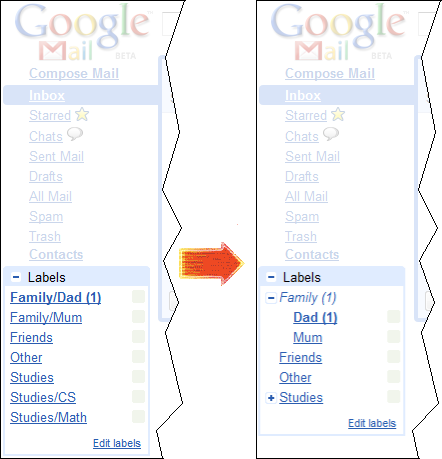
How do I arrange my labels as a hierarchy?
Suppose you have two labels:
Mum
Dad
And you want Mum and Dad to be sub-labels of Family.
All you have to do is:
- Show all labels
To see all your labels, you should go to Gmail’sSettings > Labelsand clickshow all.

- Rename your labels
DadtoFamily/Dad
MumtoFamily/Mum
- Install the Folders4Gmail Userscript
For Firefox 3 or
  Netscape 9
- Install
 Greasemonkey
 - Click here: Install Folders4Gmail Userscript
Folders4Gmail is also part of the Better Gmail 2 extension from lifehacker.com
For
 Internet Explorer 8
==>Unfortunately, the latest version doesn’t work with IE7 🙁
- Install IE7Pro
- Click here: Install Folders4Gmail IEScript
For
 Opera 10
- To enable Userscripts, use
Tools > Preferences > Advanced > Content > JavaScript options, and select the directory where you will save your Userscripts - Right-click this link to the Folders4Gmail Userscript, and save the Userscript into that directory
- You also need to enable userscripts on
https://pages.
For
 Google Chrome 2 and 3
- Enable userscripts in Chrome
- Right-click this link to the Folders4Gmail Userscript, and save the Userscript into the
User Scriptsdirectory
For
Google Chrome 4- Click here: Install Folders4Gmail Userscript
- Install
Your feedback is welcome. Write me an email at arend@arendvr.com
Changelog
- Version 1.53, March 4, 2010
Fix for a Gmail update. - Version 1.52, 9. July, 2009
Fix for a Gmail update, uses less CPU time now. - Version 1.51, 7. July 2009
Fixed Gmail Labs Task support for version 1.5. - Version 1.5, 7. July 2009
Fix for a Gmail update. - Version 1.41, 3. March 2009
Fix for tiny changes to Gmail’s code. Better support for right-to-left languages. - Version 1.4, 28. November 2008
Uses the expander images from the current Gmail theme. - Version 1.37, 17. August 2008
Fix for Gmail Labs setting “Hide unread counts”, now uses IE7Pro for Internet Explorer - Version 1.36, 17. April 2008
Fix for tiny changes to the Gmail code. - Version 1.34, 26. January 2008
Fixed the script for small changes to the Gmail code. Added support for the Gmail Macros userscript. - Version 1.32, 26. November 2007
Missing parent labels (for exampleFamilyinFamily/Mum) are now created automatically. Like in Gmail IMAP. - Version 1.3, 11. November 2007
Added support for the latest code changes in Gmail. - Version 1.24, 24. October 2007
Support for both the official Gmail IMAP-folder separator Family/Mum and the old Folders4Gmail folder separator Family\Mum. Unread messages in sub-folders now add to the unread count in their parent-folders. Sub-folders with unread messages are no longer automatically expanded. - Version 1.14, 27. August 2007
Use data URIs instead of links to images. - Version 1.1, 20. June 2007
Now uses nicer images as expanders. Thanks to Zathman for the suggestion.